CopyFilenames 3.3
 CopyFilenames is a useful extension for Windows Explorer.
|

 9.00
9.00  Trial
Trial 0K
0K
 Windows XP/Vista
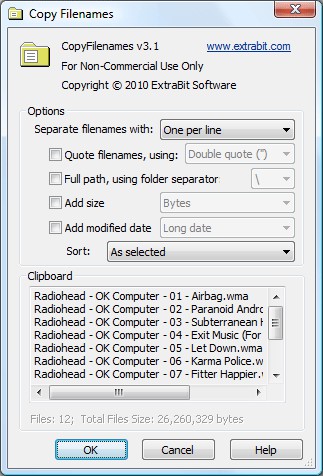
CopyFilenames is a useful extension for Windows Explorer. It cannot be run as a standalone application. After installing CopyFilenames, right click on one or more files or folders in Windows Explorer and you will see the extra commands added by CopyFilenames.
Windows has no built in way to copy a filename or folder listing to the clipboard. For a single file, you can use File > Rename, CTRL+C, then ESC to copy a filename to the clipboard, but this is quite tedious if you have to do this frequently or for lots of files.
CopyFilenames comes to the rescue! This adds an extra menu command to the context menu in Windows Explorer (this is the menu that pops up when you right click on a file). This command lets you copy the filename in one operation.
CopyFilenames can also be used to copy lots of filenames all in one go. By default, the filenames will be copied one per line.
When any folders are selected, you have the option to copy the names of all the files in the folders instead of the names of the folders, to whatever depth you want.
CopyFilenames features
Limitations
tags windows explorer add file full path filenames with the folders copy the right click the clipboard you have the names
Download CopyFilenames 3.3

Purchase:  Buy CopyFilenames 3.3
Similar software
CopyFilenames 3.3
ExtraBit Software
CopyFilenames is a useful extension for Windows Explorer.
 HobComment Explorer Extension 1.04 beta
Dr. Hoiby
HobComment Explorer Extension is a little extension for your Microsoft Explorer.
 CVS Shell Extension 1.7.2
WoLoSoft International
This Shell Extension integrates the CVS version control system into Windows Explorer.
 FolderBox 1.00
BAxBEx Software
FolderBox is an extension for Windows Explorer.
 Context Menu Extension DLL 3.1
Dmitry Miloserdov
The Context Menu Extension DLL is a very easy way to add Windows Explorer context menu extension (like WinZip) into your own software applications.
 Change Extension 1.0
Pierre-Marie DEVIGNE
Change Extension is a tiny application developed to change file extensions with ease.
 DzSoft Slide Show 2.0.0.2
DzSoft Ltd
DzSoft Slide Show is a Windows shell extension that allows you to view groups of images as a slide show instantly from Windows Explorer - just select them and choose an appropriate item of the context menu.
 Xteq Explorer LaunchPad 2.1
Xteq Systems
Xteq Explorer LaunchPad is an extension for the Windows Explorer that makes it much easier to find the directory that you want to see.
 Mozilla Sunbird 0.3.1 Final
The Mozilla Organization
Mozilla Sunbird is a redevelopment of the Mozilla Calendar extension.
 Born To Run 2.0
Lior Ostrowsky
Born To Run is an application developed very much like the Windows Run dialog.

 RSS
RSS