CCM Wizard 3.1
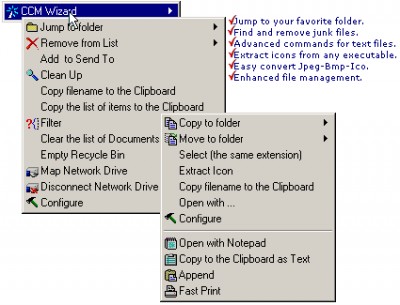
 CCM Wizard will allow you to customize the available right click options in the context menu of files, folders or desktop.
|

 9.00
9.00  Shareware
 0K
0K
 Windows Vista
CCM Wizard will allow you to customize the available right click options in the context menu of files, folders or desktop.
Creating custom menus is simple, just use the drag and drop interface and drag the commands into the desired place.
The command options are not limited to simple Explorer navigation, include several advanced options like find and remove junk and obsolete files, extract icons from exe files, database quick view, filtering and more.
CCM Wizard features
tags quick view database quick exe files from exe convert bitmap bitmap file network drive one click files with icons from extract icons and remove find and
Download CCM Wizard 3.1

Purchase:  Buy CCM Wizard 3.1
Similar software
CCM Wizard 3.1
DNTSoft
CCM Wizard will allow you to customize the available right click options in the context menu of files, folders or desktop.
 Context Menu Editor 1.0
Brett Bartholomew
Context Menu Editor can view and delete links to programs on your context menus (the popup menus you see when you right-click).
 Context Magic 1.1 Beta 5
ContextMagic.com
Context Magic is a Windows Explorer context menu extension that greatly extends functionality of the standard Send To menu and allows to manage files and folders with a few mouse clicks.
 NirExt 1.01
Nir Sofer
The NirExt utility add 3 useful context menu extensions to your Windows Explorer environment:
· Folder Properties: This option is available in the context menu when you right-click on a folder in your file system.
 ABF Favorite Folders 1.31
ABF software, Inc.
ABF Favorite Folders will allow you to easily store, manage and access a list of frequently used folders.
 Context ThumbView 1.8.6
ContextMagic.com
Context ThumbView is a Windows Explorer context menu extension that will provide image preview directly in the right-click menu.
 StudioZai Menu Organizer 1.2
StudioZai.com
Use StudioZai Menu Organizer to make your system's context menus more clean and easy to navigate.
 Add Context Menu 1.0
David Taylor
Add Context Menu is a simple component to add a right-click entry to Windows Explorer to that you can add "Process with My Application" to the list of available options.
 Perfect Menu 3.5.1
Pitrinec Software
Perfect Menu is an innovative application that will allow a user to customize or replace pop-up menu.
 Align Icons 2.0
Kanex Group, Inc.
Align Icons is a Windows context menu addition that allows you to align icons in any way you want.

 RSS
RSS