Belkasoft RemovEx 1.01
 Belkasoft RemovEx will allow users to easily disable IE and Windows Explorer plugins (so-called shell extensions).
|

 14.00
14.00  Shareware
 0K
0K
 Windows Vista
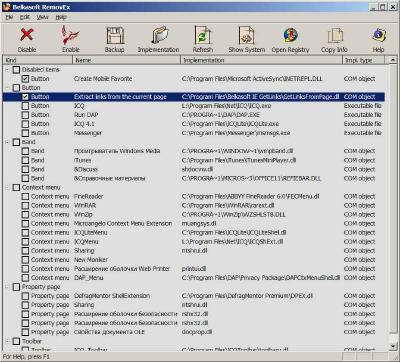
Belkasoft RemovEx will allow users to easily disable IE and Windows Explorer plugins (so-called shell extensions). The product shows you all types of extension modules existing in your system. You can select any one you would like to disable and later enable it back. Detailed information is shown about all types of extensions.
Want to get rid of annoying toolbars in IE? You Windows Explorer popup menu become a

Download Belkasoft RemovEx 1.01
 Download Belkasoft RemovEx 1.01
Purchase:  Buy Belkasoft RemovEx 1.01
Similar software
 Belkasoft RemovEx Pro 2.01
Belkasoft
Belkasoft RemovEx Pro will allow users to easily disable IE and Windows Explorer plugins (so-called shell extensions).
Belkasoft RemovEx 1.01
Belkasoft
Belkasoft RemovEx will allow users to easily disable IE and Windows Explorer plugins (so-called shell extensions).
 ShellExView 2.01
NirSoft
Shell Extensions are in-process COM objects which extends the abilities of Windows operating system.
 Shell Reset 1.2.0.161
Shell+ Development Group
Debugging of Shell extensions is a simple process.
 Belkasoft IE GetLinks 1.01
Belkasoft
Belkasoft IE GetLinks is a product for Microsoft Internet Explorer.
 EZShellExtensions.Net 2.0
Sky Software
EZShellExtensions.
 Belkasoft IE History Extractor 2.01
Belkasoft
Belkasoft IE History Extractor will allow you to extract your Microsoft Internet Explorer history to different target formats such as plain text, HTML, CSV and XML (generation of history in plain text and CSV is FULLY functional in the unregistered version).
 Belkasoft BookaMark 2.04
Belkasoft
Belkasoft BookaMark is an application that helps you to organize and manage your bookmarks easily.
 HashTab 3.0.0
Beeblebrox.org
HashTab is a Windows shell extension which adds a tab called "File Hashes" to the Windows Explorer file properties.
 Belkasoft IE Favorites Extractor 1.01
Belkasoft
Belkasoft IE Favorites Extractor was developed to let you extract the Microsoft Internet Explorer Favorites into numerous formats such as plain text format, HTML and XML.

 RSS
RSS