Printer Anywhere 1.3.5
 With PrinterAnywhere you can print documents and photos on other people’s printers as easily as on the local one connected to your machine.
|

 0.00
0.00  Freeware
 0K
0K
 Windows XP/Vista
With PrinterAnywhere you can print documents and photos on other people’s printers as easily as on the local one connected to your machine. No special technical knowledge is required from both – printer owner and user. It just works!
With our software you can print directly from your application such as Microsoft Word, Outlook, Photo Editor or any other program you work with to a printer connected to another computer next door or ten thousand miles away (anywhere!).
By using industry-standard encryption algorithms we ensure fast and secure delivery of the electronic printing materials (not your original documents!) to the other end. You can also control how many copies should be printed on the paper.
Unlike email, PrinterAnywhere does not allow forwarding electronic copies of the documents to third parties. This prevents potential misuse of the information and eliminates possible privacy issues. You don’t need to have an email account to use PrinterAnywhere.
Unlike fax, PrinterAnywhere does not require the documents being scanned and only then transmitted. As long as the documents are in an electronic form on your computer, you can print them as usual (typically by selecting menu File – Print) on the remote printer. Scanning paper documents locally and printing them on the other end is always a possibility too. And, you don’t need to have a fax machine and dedicated phone line.
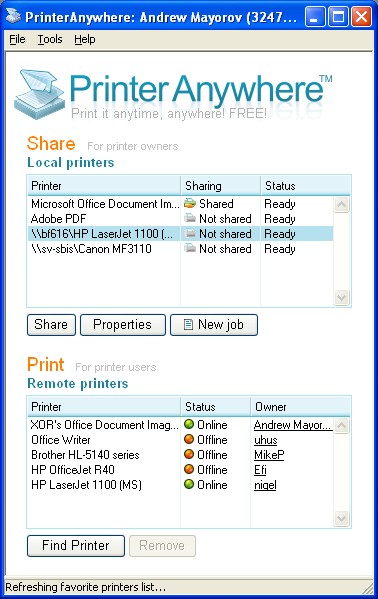
With PrinterAnywhere you can share your printer in less than a minute and let other people connected to the Internet (your friends, relative and colleagues) print paper documents on it. You don’t need to know or deal with specifics of network sharing, complex settings and figuring out Windows access rights.
Our software automatically detects printers connected to your computer including local network printers. As long as you can print in it yourself, you can share the printer and let other people use it. You can stop sharing one or any number of shared printers at any time. Sharing printers is intuitive, simple, easy to understand and control.
As an owner of the printer you may wish to confirm every print job before physically printing it on the paper. You may also wish to know who the document came from and have an option to accept or reject it. Both features are available in PrinterAnywhere software.
With our solution you can almost immediately receive and print documents and photos from your friends and relatives. You don’t need to receive emails (even to have an email account) and therefore deal with many issues associated with emails – unwanted messages (spam), viruses and spyware that are common.
Traditionally, many documents would be sent via fax. Just like fax PrinterAnywhere provides the point-to-point immediate document delivery. However, unlike fax it does not have quality issues (the documents are delivered digitally without any data or quality loss), large documents including graphics can be transmitted in seconds and you don’t need to have an ugly old fax machine.
Printer Anywhere features
Requirements
tags you can donv€™t need you donv€™t the documents can print does not and you fax machine paper documents documents are your computer can share share your
Download Printer Anywhere 1.3.5
 Download Printer Anywhere 1.3.5
Similar software
Printer Anywhere 1.3.5
Printer Anywhere Inc.
With PrinterAnywhere you can print documents and photos on other people’s printers as easily as on the local one connected to your machine.
 PrinterExpress 1.32
South Bay Software
PrinterExpress is a very useful and reliable software for people who work with many different printers on a network.
 Printer Peer 5.0.2235
Valer BOCAN
How many printers does your organization own? How many people are printing documents, and how many pages do they print each day?
Are they using those expensive color printers for everything they print? Try to add up the cost of paper, toner, ink cartridges, the maintenance, wear and tear on the equipment, and you begin to get the picture!
Dataquest figures show that the average cost of producing documents (paper, hardware, and ink) is equivalent to 40% of labor cost.
 CZ Print Deleter 1.0
CZ Solution
CZ Print Deleter is a powerful tool that allows centralized, automatic deleting of print jobs for the local and network printers.
 Qcontrol 1.22a
A.N.D Technologies
Qcontrol is a cross-platform tool for monitoring of network printers and queues.
 Move My Printers 03.01.01
OCI Technologies, LLC
Move My Printers is a suite of applications consisting of the Move My Printers Deployment Toolkit, Move My Printers Engine and the My Print Driver Information applications which enhance a Network Administrators ability to migrate and maintain client printers.
 Print Distributor 4.2
Frogmore Computer Services
Use Print Distributor to easily archive, distribute, route and control your printed output.
 PrintConductor 1.5
fCoder Group Inc
PrintConductor is a software designed to print any number of documents in batch mode.
 Brooks INTELLIscribe LPR Client 4.0.0.65
Brooks Internet Software
INTELLIscribe is an LPR Print Client enabling you to seamlessly send documents to printers and print servers anywhere in the world using the TCP/IP Internet protocol.
 Advanced Printers Activity Logger 1.2
Menesk Software
The expenses on printing documents (paper, toner, printer maintenance) are very sensitive even for a medium-size enterprise.

 RSS
RSS