pptXTREME Effects library for PowerPoint 2.00.02
 Never re-create custom animations in PowerPoint again.
|

 149.00
  Shareware
 0K
0K
 Windows Vista
Never re-create custom animations in PowerPoint again.
Save complex animation settings, then reuse them at any time with the click of a button!!
Do you like to spend time on your custom animations, but find it's not worth it because you cannot save and re-use them. Now spend the time, get it perfect and then save them into a library so you can use them over and over. Your clients will think you spent days animating the presentation, when it took less than an hour!
Effects Library enables you to save and re-apply complex animations into libraries that are accessible with a single click. Ultimate flexibility to create multiple categories and libraries that you can organize any way you like.
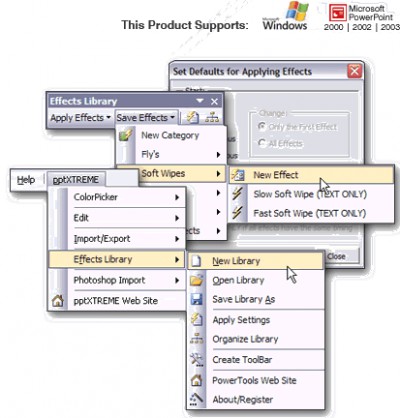
Create your custom animation. With the shape selected click on Save Effects, pick a category and give it a name. That is all you have to do! No more recreating effects – easily access your categories of effects in your current library with the Save Effects toolset. You can retain your custom effects and settings, storing them in the Effects pull down menu for future use.
Now all you need is one simple click from the Apply Effects menu and an effect will be applied to all selected shapes.
Effortlessly manage your growing library of effects with the Organize Library toolset!! You'll have the flexibility to cut, copy, paste and delete categories and effects plus define the order in which they appear in menus.
As an added bonus, Effects Library comes with 38 pre-programmed effects.
See our website for a complete list of features.
tags with the your custom you can categories and save effects all you toolset you libraries that effects library save and use them custom animations you like
Download pptXTREME Effects library for PowerPoint 2.00.02
 Download pptXTREME Effects library for PowerPoint 2.00.02
Purchase:  Buy pptXTREME Effects library for PowerPoint 2.00.02
Similar software
pptXTREME Effects library for PowerPoint 2.00.02
pptXTREME
Never re-create custom animations in PowerPoint again.
 Mix-FX 1.05
Trellian
Want to create Flash animations such as Flash buttons, Flash banners, Flash intros, Flash effects and Flash text effects, but don't have Macromedia Flash or don't know how to use it for complex Flash animations?
Don't worry, Mix-FX comes to your rescue.
 PPT XTREME Edit for PowerPoint 1.5
pptXTREME
Streamline and speed up the process for creating and modifying your presentation slides without the built-in hassles!!
If you're tired of pulling out your hair while you build, modify and rebuild complex slides, your worries are over! With Edit's comprehensive suite of tools, you will never have to recreate animations settings or spend hours developing a printer friendly version again! You can access and manage these robust and simple short-cuts right from a single toolbar or directly from the menu bar - as easy as 1,2,3!!
Avoid losing your custom animation settings with Animations Setting Painter!! Just two clicks allow you to easily pick up and reapply those complex animations you would have otherwise lost while modifying groups.
 Mix-FX Flash Animations and Buttons 1.042
Triple W communications
Mix and match your own effects with Mix-FX! Want to create amazing Flash TEXT EFFECTS, or FLASH BUTTONS, but don't have Macromedia Flash or don't know how to use it for complex animations? Don't worry, Mix-FX comes to your rescue.
 Amara Flash Intro and Banner Builder 3.33
Amara Software
Amara Flash Intro and Banner Builder is the ultimate flash text effect tool to help the web designer to create and design animated Flash intros, Flash banners, Flash ads, Flash popups and any other Flash animation.
 Animation Workshop 2.0a.18
Alchemy Mindworks Inc.
With Animation Workshop you can build professional banners, advertisements and other commercial animations in minutes with an impressively short learning curve.
 Mix-FX Flash Text Effects 1.04
Triple W communications
Mix and match your own effects with Mix-FX!
Want to create amazing Flash TEXT EFFECTS, or FLASH BUTTONS, but don't have Macromedia Flash or don't know how to use it for complex animations? Don't worry, Mix-FX comes to your rescue.
 PowerVideoMaker for PowerPoint 2000 2.0.1
PresenterSoft Inc
PowerVideoMaker is a useful and perfect solution for converting Powerpoint to DVD-quality video in WMV, AVI or MPEG format.
 Microsoft PowerPoint Viewer 2007
Microsoft
PowerPoint Viewer 2007 lets you view full-featured presentations created in PowerPoint 97 and later versions.
 PowerVideoMaker Professional 5.0
PresenterSoft Inc
PowerVideoMaker Professional is a program that will allow you to convert PowerPoint files.

 RSS
RSS