Clip Plus 6.1.4
 Clip Plus enhances the Windows Clipboard, making it a true power tool.
|

 19.00
19.00  Shareware
 0K
0K
 Windows Vista
Clip Plus enhances the Windows Clipboard, making it a true power tool.
Windows Clipboard is the built-in storage for the data transfer between different applications. You don't normally see the clipboard: it works in background, by keeping the items that you copy or cut, and letting you insert them into other documents with the paste command.
The Cut, Copy, and Paste capabilities of Windows works well for transferring single items of data but is not useful if you want to move a lot of data or keep data longer than until your next cut or copy. Because Windows overwrites the clipboard whether you were ready or not.
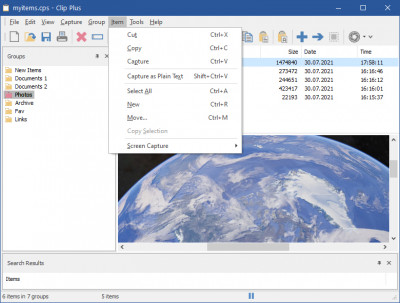
Clip Plus works alongside the regular Windows clipboard and automatically grabs and saves text. images, and objects as they are copied to the Windows Clipboard - making them available for saving, reuse, and printing.
The system is accessible and easy to use. A tray icon gives quick access to the program and an indicator of whether you are in capture or pause modes; you can open the main display where your clipped items are stored. You can create and save groups of items, and save individual text and graphics items; both text and graphics can be printed.
Options include automatic saves, icon animation, system-wide hot keys and an optional sound effect of your choice when an item is captured. Clip Plus also supports .mpl file format that uses in Maple document manager.
With the award-winning Clip Plus as your Windows companion, you will take the underpowered Clipboard and turn it into an unexpectedly powerful timesaver.
A tray icon gives quick access to the program and an indicator of whether you are in capture or pause modes; you can open the main display where your clipped items are stored.Clip Plus is a tool that will capture and store images and text files.
You can create and save groups of items, and save individual clips, text and graphics can be printed. Options include automatic saves, icon animation, and sound effects.
Limitations
Requirements
·
tags clip plus and save you can windows clipboard and graphics whether you text and are stored saves icon can create items are icon animation your clipped
Download Clip Plus 6.1.4

Purchase:  Buy Clip Plus 6.1.4
Similar software
 ClipMate Clipboard Extender 7.1.07.173
Thornsoft Development, Inc.
ClipMate enhances the Windows clipboard, making it a true power tool.
Clip Plus 6.1.4
Crystal Office Systems
Clip Plus enhances the Windows Clipboard, making it a true power tool.
 Smart Paste 1.1
Online P2000
Smart Paste is a multi-line text storage manager, which enhances your window clipboard capabilities.
 M8 Multi Clipboard for Windows 10.03.06
M8 Software(UK)
M8 multi clipboard captures everything that you cut or copy from any program.
 Clipboard History 1.0
Greatis Software
Clipboard History is a useful text clipboard monitor utility that comes with clip history support.
 Clipboard Magic 5.05
CyberMatrix Corporation, Inc.
Clipboard Magic is a freeware Windows Clipboard archiving tool.
 Clip Tracking 1.0
Vasilios Freeware
Clip Tracking - follow the changes of your Clipboard and Edit,Print or Save its contents instantly.
 Softaholic's ClipboardSaver 2.0.1
Softaholic.com
Softaholic's ClipboardSaver is a handy tool which works with the Windows Clipboard.
 Clipboard Assistant 1.139
Ixis Ltd
Clipboard Assistant is intended for an acceleration and a simplification of text operations via the Clipboard.
 Karen's Clipboard Viewer 2.2
Karen Kenworthy
Karen's Clipboard Viewer - Peek inside your Windows clipboard.

 RSS
RSS