Classic Menu for Word 2007 7.00
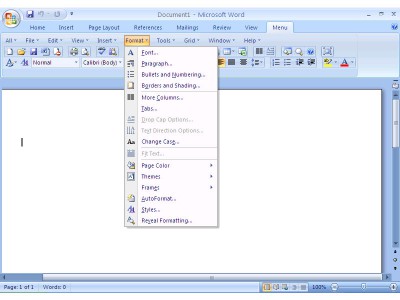
 Classic Menu for Word 2007 display the classic menus and toolbars of Word 2007, as in the Word 2003/XP.
|

 9.00
9.00  Trial
Trial 0K
0K
 Windows XP/Vista
Classic Menu for Word 2007 display the classic menus and toolbars of Word 2007, as in the Word 2003/XP.
Requirements
Limitations

Download Classic Menu for Word 2007 7.00
 Download Classic Menu for Word 2007 7.00
Purchase:  Buy Classic Menu for Word 2007 7.00
Similar software
Classic Menu for Word 2007 7.00
addintools
Classic Menu for Word 2007 display the classic menus and toolbars of Word 2007, as in the Word 2003/XP.
 Classic Menu for PowerPoint 2007 7.00
Addintools
Classic Menu for PowerPoint 2007 display the classic menus and toolbars of PowerPoint 2007, as in the PowerPoint 2003/XP.
 Classic Menu for Excel 2007 7.00
Addintools
Classic Menu for Excel 2007 display the classic menus and toolbars of Excel 2007, as in the Excel 2003/XP.
 Add-in Express for VCL 2007.3.4
Add-in Express Ltd.
With Add-in Express 2007 for Delphi you can create deployable, updatable, secure and isolated, version-neutral feature-rich plug-ins for all available Microsoft Office versions, including Office 2007, 2003, 2002 (XP) and Office 2.
 Microsoft Save as PDF or XPS 1.0
Microsoft Corp.
Microsoft Save as PDF or XPS will allow you to export and save to the PDF and XPS formats in eight 2007 Microsoft Office programs.
 Add-in Express for .NET 2007.3.4
Add-in Express Ltd.
AUse visual designers of Add-in Express 2007 for .
 Microsoft Office Compatibility Pack 2007 File Formats 1.0
Microsoft
By installing the Compatibility Pack in addition to Microsoft Office 2000, Office XP, or Office 2003, you will be permitted to open, edit, and save files using the file formats new to Word, Excel, and PowerPoint 2007.
 Add-in Express 2 .NET Edition 2.4
Afalina Co., Ltd.
Add-in Express 2 .
 StarOffice 8 Conversion Technology Preview 1.0
Sun Microsystems
StarOffice 8 Conversion Technology Preview is a plug-in for Microsoft Word 2003 that allows users of Microsoft Word 2003 to read, edit and save import to the OpenDocument Format (ODF).
 Read in Microsoft Reader 1.1.3
Microsoft Corporation
With the Word 2000/XP/2003 Add-in: Read in Microsoft Reader (RMR), you can use Microsoft Word 2000, Microsoft Word XP or Microsoft Word 2003 to create your own Microsoft Reader eBooks.

 RSS
RSS