CDMenu 3.0
 With CDMenu you will be able to create your own professional CD autostart menu.
|

 19.00
19.00  Shareware
 0K
0K
 Windows Vista
With CDMenu you will be able to create your own professional CD autostart menu.
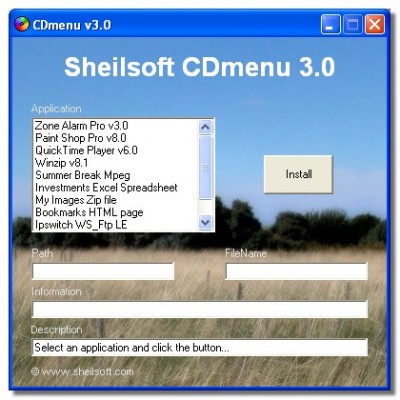
Launch your CDs professionally with the help of the Windows Autorun feature. Offer the users of your CDs an autoplay menu that is clear, that provides information about the CD and its contents and that presents all possible actions clearly.
Using CDMenu you create your own individual menu interface without any programming knowledge. All registered file types and programs can be linked using the buttons. Moreover, CDMenu is smart. It launches corresponding programs to match all registered document types (HTML, DOC, TXT, PPT,...). CDMenu creates all files needed by Autostart (Autorun.inf).
CDMenu sets your creativity free. With the help of background images and bitmap buttons, the menu designer has full control over the final appearance of the user interface.
The Professional Editions also include integrated Sound and AVI Players, which make it possible for these files to be played without triggering the Windows media player. These Editions also feature frameless windows without title bars.
The created menu requires no registry entries, runtime modules and DLLs of it's own.
CDMenu features
tags programming knowledge the windows all registered registered document editions also the help with the cdmenu you create your your own your cds with cdmenu
Download CDMenu 3.0

Purchase:  Buy CDMenu 3.0
Similar software
CDMenu 3.0
Klaus Schwenk Software
With CDMenu you will be able to create your own professional CD autostart menu.
 Vista Drop Down Menu 1.0.0
f-source
Vista Drop Down Menu is a professionally designed drop down menu bar.
 CD FrontEnd Lite 2018.33
Visual Vision
The CD Front End allows you to create an autorun / autoplay / autostart / autoinstall CD.
 Autorun Action Menu 3.1.2
Pollen Software
Autorun Action Menu is an easy-to-use Autorun/ Autostart menu creator specifically designed for individual users with CDR drives.
 AUTOption Graphic 9.0
Pollen Software
AUTOption Graphic is a customizable Autorun/Autoplay menuing application that gives a highly professional touch to your CDs.
 Autostart and Process Viewer 1.41
Konrad Papala
Autostart and Process Viewer is an application that allows you to view the currently running processes, and to view and remove the autostart entries.
 Hidden Menu . Revision 2
CoPos
Hidden Menu is the perfect solution for your need to launch programs quickly.
 FastMenu 3.2
Pollen Software
FastMenu offers the ability for anyone to swiftly create clean, crisp Autorun/Autostart menus for CDs.
 GSA Autostart Cleaner 2.47
GSA
Did you ever wonder why it takes so long until your computer starts up? Did you ever wonder why so many programs load when you turn your pc on? Did you ever wonder why everything is so slow or why you leak of available memory?
Get rid of those useless programs.
 Key Launch 2.0
Konrad Papala
How long does it take before you'll find a program in your Start Menu? If you're familiar with a keyboard, then you can do this in less than a second with Key Launch.

 RSS
RSS