AutoPlay me for PDF 5.0.2
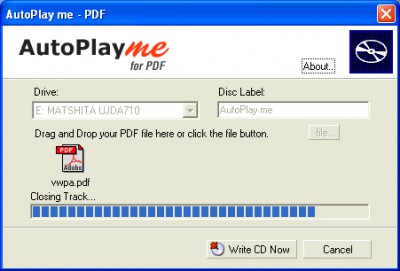
 Simply drag and drop your PDF file and then press the Write CD Now button and you are done.
|

 29.00
29.00  Shareware
 0K
0K
 Windows Vista
Simply drag and drop your PDF file and then press the Write CD Now button and you are done. AutoPlay me for PDF does all the work. Not only does it add your file it also adds the Foxit PDF Reader to the cd. Your PDF Document runs through this viewer so you now do not need to worry whether a PDF viewer is installed on the target computer.

Download AutoPlay me for PDF 5.0.2
 Download AutoPlay me for PDF 5.0.2
Purchase:  Buy AutoPlay me for PDF 5.0.2
Similar software
AutoPlay me for PDF 5.0.2
Framewood Technologies
Simply drag and drop your PDF file and then press the Write CD Now button and you are done.
 AutoPlay me PRO 5.0.2
Framewood Technologies
Simply drag and drop your PowerPoint, Word or PDF file and then press the Write CD Now button and you are done.
 AutoPlay me for PowerPoint 2.02
Framewood Technologies
Simply drag and drop your powerpoint presentation file and then press the Write CD Now button and you are done.
 AutoPlay me for Word 5.0.2
Framewood Technologies
Simply drag and drop your Word Document file and then press the Write CD Now button and you are done.
 Stop Autoplay 0.4.1
SUN Chun-Yen
Stop Autoplay is a small and simple extension for Mozilla Firefox.
 Cd Autoplay Gen 2.0
Logiccode
Cd Autoplay Gen is a program that will autoplay any CD inserted in the
CD-ROM.
 Oscar's MiniCLIP 2002 1.0
www.MediaChance.com
Oscar's MiniCLIP is an application designed to be just the best text clipboard extender.
 4Menu basic CD front end 1.558
Visual Vision
4 Menu Basic is a simple set of files: it allows you to create an autoplay / autorun CD where you can put any kind of file.
 AutoPlay Magic 2.2.0
Typhoon Software
AutoPlay Magic is a CD/DVD creator that can be used by anyone.
 Drag Drop and Replace 1.0
Skyjuice Software
Drag Drop and Replace is an utility that helps you to simply fill in the words to replace, and drag and drop the files to be replaced.

 RSS
RSS