WHOS-IN Pro In-Out Board 2012-03A
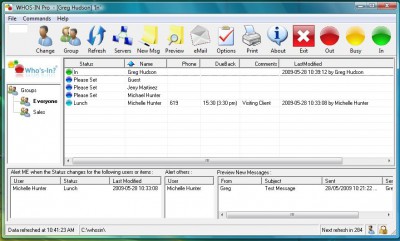
 WHOS-IN Pro is an easy to use Windows in-out board application for businesses that need to keep track of who's in and who's out of the office.
|

 0.00
0.00  Freeware
 0K
0K
 Windows Vista
WHOS-IN Pro is an easy to use Windows in-out board application for businesses that need to keep track of who's in and who's out of the office.
With WHOS-IN there is no more time wasted checking a wall-mounted Office Board to see if someone is In, Out, or at Lunch... all the information you need is presented on screen in an easy to read format.
Having a snapshot or status view of your co-workers whereabouts makes it possible to give better information to callers, and to avoid putting telephone calls through to employees who are not at their desks. WHOS-IN also reduces wasted time when an employee needs to find a co-worker to talk to him or her.
Setting your (or others) status is VERY simple, fast, and intuitive, ensuring that the program will be used consistently. A simple Out to Lunch notification requires as little as one mouse-click, and you are on your way.
WHOS-IN can also set your Status to IN when the program starts, and OUT when it shuts down, which further enhances its ease-of-use, and gives the added benefit that people do not need to remember to update their own status at these times.
WHOS-IN can also access remote copies in branch offices across your high-speed (T-1 preferred) Wide Area Network, allowing you to examine the status of people at an interstate or inter-city location. Imagine the time and money saved in long distance phone calls if you already know someone is On Vacation for example.
Equally, there is no need to restrict the use of WHOS-IN to just people either... You can just as easily keep tabs on Vehicles, Laptops, Cell Phones, Meeting Rooms, or just about any other item you care to think of - the potential uses are almost limitless.
WHOS-IN is designed to be easy to use, however it is also highly configurable, with user defined colored Status buttons on the ToolBar, Groups or Departments displayed in Tab format, and your custom company logo for the background.
Here are some key features of "WHOS IN Pro In Out Board":
Requirements
tags add your can also cell phones keep tabs you can meeting rooms company logo your own allows you the status use whos allowing you the program
Download WHOS-IN Pro In-Out Board 2012-03A
 Download WHOS-IN Pro In-Out Board 2012-03A
Similar software
WHOS-IN Pro In-Out Board 2012-03A
Hudson Software
WHOS-IN Pro is an easy to use Windows in-out board application for businesses that need to keep track of who's in and who's out of the office.
 Look-Whos-Talking 1.5
booters.org
 Memo Board 1.0.28
Meltdown Software
Memo Board allows you to jot down random memo's, in an easy, simple visual environment.
 JotMe Primo 1.1.0.1
Rubarto
Many excellent businesses waste time and money every day through unnecessary lack of communication and simple loss of important data.
 Pentacle In-Out Board 10.03.0.28
G2Soft.Net
Pentacle In-Out Board can be used as web-based in-out board, Net-Based stuff tracking system, stuff-finder, Employee in/out board, E - signin/out program.
 PhoneMGR 2.0
Capp-Ware Solutions, LLC
PhoneMGR is an Employee In/Out Board and Message Management for Windows based systems.
 The Keys Program 3.1
CyberNiche Software
The Keys Program is an easy to use database for businesses to keep track of keys for buildings, offices or vehicles that are issued to employees or other individuals.
 Scotland Yard 9.3
OfficeTool.com, Inc.
What do you do when you need someone in your office but they're not at their desk, not answering their phone, or simply can't be found? You spend 10 minutes looking for them, then leave a voice mail or email and hope you'll hear from them "when" they return
SCOTLAND YARD is an electronic sign in out board that helps track the location of employees.
 In-Out Board 1.20
Glass Bead Software
In-Out Board is the cross-platform staff in/out tracking tool for your office.
 Enterprise Staff Indicator 5.0
Pete Bent
The Enterprise Staff Indicator is an easy to use, intuitive staff attendance (In-Out) status board to help you track and keep in touch with your staff.

 RSS
RSS