AutoPlay Media Studio 6.05
 AutoPlay Media Studio will help you create professional software, presentations, autorun CD/DVD ROMs and more by simply dragging, dropping, and integrating your favorite media files such as MP3s, video, photos, and flash movies in AutoPlay Media Studio.
|

 395.00
  Trial
Trial 0K
0K
 Windows Vista
AutoPlay Media Studio will help you create professional software, presentations, autorun CD/DVD ROMs and more by simply dragging, dropping, and integrating your favorite media files such as MP3s, video, photos, and flash movies in AutoPlay Media Studio..
It's just that easy. Then create powerful interactions between your media files and objects by selecting actions from a friendly script menu and publish your projects with a single click.
AutoPlay Media Studio is the industry standard for creating professional interactive CD-ROM AutoPlay and AutoRun menu systems.
AutoPlay Media Studio Makes It Easy
With AutoPlay Media Studio it's easy to create your own interactive multimedia software. Even if you’re not a “programmer”, you’ll be creating professional projects in no time. It’s all done in a completely visual, drag-and-drop design environment. From images, text and music to video, drop-down lists and web content, you simply move things into place using your mouse.
Add Powerful Interactivity
With a built-in library of more than 250 easy to use actions, adding interactivity to your projects is a breeze. Whether you’re a complete novice or a seasoned programmer used to working with Microsoft Visual Basic, Macromedia Director, Microsoft Visual C++ or Borland Delphi, you’ll find that AutoPlay Media Studio 6.0 deserves a place in your toolbox. It’s perfect for making autorun CD/DVD’s, software installer menus, electronic business cards, training material and just about any other interactive multimedia project you can think of!
Drag-and-Drop Development
Creating professional multimedia software can be both easy and fun, thanks to AutoPlay Media Studio 6.0. In fact, with our award winning WYSIWYG (what you see is what you get) visual design environment, anyone can do it! Simply drag and drop your media content (text, photos, videos, Macromedia Flash, and much more) onto “pages” and then add interactivity with over 250 built-in actions. It couldn’t be easier!
Interactive Objects
There are over a dozen different object types to choose from. Objects types include buttons, text labels, paragraph text, images, videos, Macromedia Flash, web browsers, hotspots, input fields, list boxes, drop-down lists, progress bars and tree controls. Each object includes a variety of events and is fully customizable.
Easy Publishing
AutoPlay Media Studio makes packaging up and distributing your finished project a snap. Whether you’d like to create a single-file executable for distribution by web download or email, or burn it to a CD/DVD data disc, it just takes a few clicks. You can even choose to publish to ISO CD/DVD images or to a hard drive folder for packing it up with an installer/setup builder.
Professional Templates
Choose from a variety of ready-to-use projects and then modify them to fit your needs. We include examples of software installer menus, electronic business cards, marketing brochures and many others. It’s also easy to make your own project templates or to add-in templates made by others.
Easy to Learn
It couldn’t be easier to create powerful multimedia applications. We’ve packed the software with wizards, tutorials, a user’s guide, context sensitive help and much more. It’s also backed up with world-class technical support options, online discussion groups, and video training lessons.
Content Gallery
We’ve included a ton of great content to get you started including background images, photos, abstracts, panels, bars, bullets, buttons, sound effects and even music files. Simply mix and match to put together a great looking project in no time.
Project Explorer
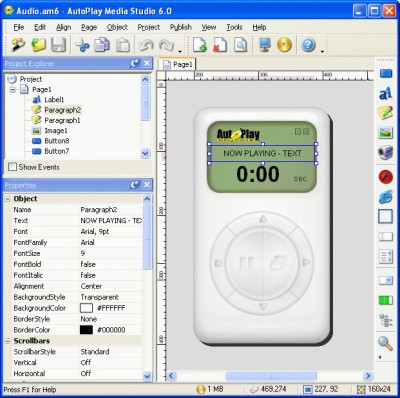
Get an overview of your project in one place. You can see all of the pages, events and objects in your project organized into a tree hierarchy. Double-click any item to edit its properties or right-click for common commands. It’s a great way to see how everything is connected.
AutoPlay Media Studio features
Limitations
tags media studio autoplay media and drop drag and perfect for your own you can creating professional business cards macromedia flash installer menus videos macromedia and then
Download AutoPlay Media Studio 6.05
 Download AutoPlay Media Studio 6.05
Purchase:  Buy AutoPlay Media Studio 6.05
Similar software
 AutoRun Design Specialty 7.0.3.8
Alleysoft Software
AutoRun Design Specialty is a useful and powerful visual tool that can create professional autorun (autoplay) interfaces and presentations for your CD/DVDs.
 CDStartDummy! 2.6
ksoft
CDStartDummy! will create autoplay CD-ROMs with the ability to launch any file type you wish ranging from web page presentations to movies.
 CDInterface Studio 2.3.6.1
Theodoros Antoniou
CDInterface studio is a freeware application developed for creating autoplay/autorun cd menus.
 MY AUTOPLAY 8.6
MY AUTORUN
MY AUTOPLAY professional is easy tool for creating powerful autoplay menus without programming experience by MY AUTOPLAY professional.
 DivX Autorun 1.3
Jouni Vuorio
Now you are able to easily create autorun menus for your DivX cd-roms.
 Right Autorun Pro 2.1
right files
Right Autorun Pro creates presentation slides and autorun CD.
AutoPlay Media Studio 6.05
Indigo Rose Software
AutoPlay Media Studio will help you create professional software, presentations, autorun CD/DVD ROMs and more by simply dragging, dropping, and integrating your favorite media files such as MP3s, video, photos, and flash movies in AutoPlay Media Studio.
 Autorun Action Flash 4.1.0
Pollen Software
Autorun Action Flash is a useful utility that allows you to create striking Autorun/Autoplay CDs.
 Autorun MAX! 2.0
Pocket Dog, Inc.
Autorun MAX! gives you the power to create professional looking CD-ROM/DVD-ROM autorun / autoplay menus, CD business cards, scrapbooks, photo journals, brochures, demos and other interactive multimedia projects.
 AutoRun Typhoon III 3.2.3
Typhoon Software
AutoRun - if you want to deliver your Menu, web site, PDF file, PowerPoint presentation, video, SlideShow, just about anything, on a CD-ROM then AutoRun is the tool you need.

 RSS
RSS