SL-Message 1.05.0003
 SL-Message gives you the chance to control your network clients remotely from your desktop.
SL-Message gives you the chance to control your network clients remotely from your desktop. You can send alert messages, manage running tasks and start new programs. You can connect and disconnect network resources on remote clients. Shutdown and lock workstations across your network. SL-Message provides a powerful built-in scripting-language to perform actions on many computers at the same time. Help desk and administrators will love this tool!
Here are some key features of "SL Message":
General:
Show information about the Workstation, the configuration of SL-Message receive components, Change system environment variables
Minimize SL-Send to System tray (beneath the clock) if you want
Supports Windows NT3.51, NT4.0, 2000, XP
English and German user interface and eventlog entries
Does not depend on special network protocols
SL-Message does not need a dedicated server
Supports Windows NT domain networks (selectable domain controller) and workgroups (peer to peer networks)
Very low network, cpu and memory load
The receive program is implemented as a real Windows NT-Service (can be managed from your desktop)
Comes with install-scripts to install the receive components in your whole network very easy
Comes with install-files supporting installation via SMS
Automatic Update of the receive components when accessing client
Synchronize the system time in the whole network in adjustable intervals
Set system time of clients manual
User interface can be restricted per user (only the settings you want may be changed)
Easy change Trial-version into Full version, no need to reinstall any program
Messages and Scriptcommands:
Dispatch Messages and Scriptcommands to NT-Workstations
Select icon per message
Select or filter recipients using queries
Choose Timeout or user response per message
Exec Scriptcommands before and after a message is displayed
Retrieve missed messages at next system-start
Receive messages even there is no user logged on
Quits running NT-Screensaver when displaying message
Optional acknowledgement of dispatched messages
Optional validity period of messages
Full Logging of all processes in the NT-Eventlog
(Displaytime, Name of the user who read it and how the user has responded)
Optional message routing to other networks (even if broadcasts are disabled in your router configuration)
Shows messages per user or per workstation
Optional receipt of messages from IPC Winpopup sources (net send, servers)
Duplicate message filtering (even with Winpopup messages)
Receive - program can not be closed by user
Receive - program runs completely hidden (if you want) or stays in the system tray (NT4+)
Use Templates for frequently used messages
Define your own Mailing lists with frequently used recipients
Additional command-line send-program SL-CSend (works without user input) to use in script files or to schedule messages (e.g. with Windows Scheduler)
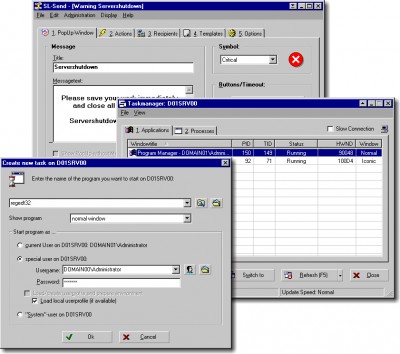
Remote-Taskmanager (Screenshots):
Monitors running applications and processes (like NT4-Taskmanager)
Selectable columns in Taskmanager (e.g. Thread Count, % CPU-Time)
Adjustable update speed
Use many Remote-Taskmanager-Windows at the same time
Many users may monitor one computer at the same time
Start programs and documents in any user context
Optionally load the corresponding user profile
Terminate applications and processes (processes may be "killed" with seliSoft Saveterminate to properly free locked files and memory)
Switch applications (even under Windows 2000)
Change priority of processes
Change window state of application (maximize, minimize)
Remote-Taskmanager optionally stay on top of all other windows
Full support for NT-Security (only Administrators may start and terminate programs on other computers in the network
User and Network (Screenshots):
Scan network for user (Screenshots)
Show detailed Information about the current user
Connect and disconnect network resources (Network-Shares, Printer shares)
Add and remove network pri
tags the receive receive components you want receive program the same same time remote taskmanager whole network the system with install comes with and processes applications and
Download SL-Message 1.05.0003
 Download SL-Message 1.05.0003
Purchase:  Buy SL-Message 1.05.0003
Similar software
SL-Message 1.05.0003
seliSoft
SL-Message gives you the chance to control your network clients remotely from your desktop.
 ACEmessage 10.0.7
Spydaman Design Studios 2004
ACEmessage is one way network messaging software for computer users (and Administrators) to send out instant network desktop popup messages to groups of users quickly and easily (Very similar to Net Send and Win Popup).
 Net Control 1.04.4
PetSoft.eu
Net Control is a powerful PC remote control application for classroom networks, office and home remote monitoring and administration computers.
 Net Send Lite 3.02
RJL Software, Inc.
Net Send Lite is a small utility that uses the existing Microsoft Messaging Service to send network messages.
 E-mail Follow-Up 1.12
MAPILab Ltd
E-mail Follow-Up allows (and reminds you!) to send follow-up e-mail messages if a reply has not been received within a specified time-frame.
 Group Net Send 1.01
RJL Software, Inc.
Group Net Send is a small command line tool that send messages to multiple users or groups of users.
 e/pop Alert 3.1
WiredRed Software
e/pop Alert is a secure, one-way, alert messaging system that delivers PC desktop popup alerts - in real-time across LAN-segment, NAT, firewall, and proxy boundaries - to 100's or 1,'s of PC's.
 Net Send Message 1.1
JCITS Systems
NetSend.
 DeskAlerts 4.2
Softomate
DeskAlerts - desktop alert software is the easiest way to provide your customers with your news and alerts.
 TextTak 1.0.2.0
PCPM Software Limited
TextTak is a network popup message application designed for those occasions when you need to alert a colleague quickly and almost instantly, but don't require the formality and complexity of multi-directory sent and received message storage, as typically found in email applications.

 17.00
17.00  Shareware
 0K
0K
 Windows Vista

 RSS
RSS