Filemon 7.03
 Filemon will monitor and display file system activity on a system in real-time.
|

 0.00
0.00  Freeware
 0K
0K
 Windows Vista
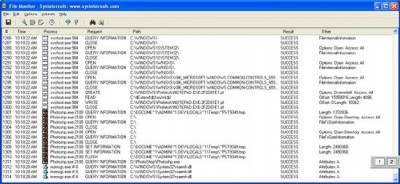
Filemon will monitor and display file system activity on a system in real-time. Its advanced capabilities make it a powerful tool for exploring the way Windows works, seeing how applications use the files and DLLs, or tracking down problems in system or application file configurations.
Filemon`s timestamping feature will show you precisely when every open, read, write or delete, happens, and its status column tells you the outcome.
Filemon is so easy to use that you`ll be an expert within minutes. It begins monitoring when you start it, and its output window can be saved to a file for off-line viewing. It has full search capability, and if you find that you`re getting information overload, simply set up one or more filters.
Filemon works on NT 4.0, Windows 2, Windows XP, Windows XP 64-bit Edition, Windows 95, Windows 98 and Windows ME. Sysinternals also has a version of Filemon for Linux.
Installation and Use Simply run FileMon (filemon.exe). You must have administrator privilege to run FileMon. When FileMon is started for the first time it will monitor all local hard drives. Menus, hot-keys, or toolbar buttons can be used to clear the window, select and deselect monitored volumes including network volumes (Windows NT/2K/XP), save the monitored data to a file, and to filter and search output.
If you've specified filters then FileMon will ask you to confirm filters used from the last session each time you start it. To start FileMon without it prompting you specify the /q switch on the command line. When FileMon starts it automatically captures file system activity. To start it with capture disabled use the /o switch on the command-line.
As events are printed to the output, they are tagged with a sequence number. If Filemon’s internal buffers are overflowed during extremely heavy activity, this will be reflected with gaps in the sequence number.
Each time you exit FileMon it remembers the filters you've configured, position of the window and the widths of the output columns.
Filtering Use the Filter dialog, which is accessed with a toolbar button or the Edit|Filter/Highlight menu selection, to select what data will be shown in the list view. The '*' wildcard matches arbitrary strings, and the filters are case-insensitive. Only matches shown in the include filter, but that are not excluded with the exclude filter, are displayed. Use ';' to separate multiple strings in a filter (e.g. "filemon;temp"). Windows NT/2 note: because of the asynchronous nature of file I/O, its not possible to filter on the result field.
Wildcards allow for complex pattern matching, making it possible to match specific file accesses by specific applications, for example. The include filter “Winword*Windows” would have FileMon only show accesses by Microsoft Word to files and directories that include the word “Windows”.
Use the highlight filter specify output that you want to have highlighted in the listview output. Select highlighting colors with Edit|Highlight Colors.
Additional filter options select or deselect read, write or open operations. In many troubleshooting scenarios only open operations are of interest, for example.
tags use the sequence number the output command line the command the filters the include open operations for example include filter time you and the the window
Download Filemon 7.03

Similar software
Filemon 7.03
Sysinternals
Filemon will monitor and display file system activity on a system in real-time.
 CenvoRox File Monitor 3.2.4
CenvoRox Software
CenvoRox File Monitor monitors file activity in real-time, seeing which file or folder is added/modified/removed/renamed and saving the results.
 Microsoft Process Monitor 1.12
Microsoft Inc
Process Monitor is an advanced monitoring tool for Windows that shows real-time file system, Registry and process/thread activity.
 Advanced Time Reports Monitor 7.5.22
Xpress Software Inc.
Advanced Time Reports Monitor monitors and records your computer activity and allocates it to predefined projects.
 Actions Monitor 1.02
Segobit Software
Actions Monitor is a Win32 application that monitors, display and save all file system activity on a system.
 Process Controller 3.0
k23 productions
Process Controller is a system tray-based application that will help you monitor and control in real time the activity and resources of your computer.
 Ascella Log Monitor 1.0
AAR Software Ltd.
Ascella Log Monitor monitors the Windows event logs at real-time for any activity that matches the specified rules.
 HSLAB Sys Monitor Lite 2.0.6.1
Handy Software Lab
HSLAB Sys Monitor Lite is an advanced program that monitors and shows Windows statistics in real-time.
 System Safety Monitor 2.3.0.609
System Safety
System Safety Monitor (SSM) allows you to track down Microsoft Windows operating system activity in real-time and to prevent undesirable actions from various malware and spyware programs.
 EF System Monitor 26.05
EFSoftware
EF System Monitor - A comprehensive tool which provides you with a permanent record of information like memory space, hard disk usage, date, time, user name, etc.

 RSS
RSS